Divorce Records in Kane County can be located through the official online portal, where users enter a divorce case number or filing date to retrieve case filings, decrees, and custody terms. The system displays petitions, orders, and final judgments, and offers a certified copy request for a small fee. Quick access helps attorneys, lenders, and families confirm property division, spousal support, and child custody details without a courthouse visit.
Divorce Records are considered public court records in Kane County, yet sensitive information such as minor names or sealed financial data remains protected. A simple divorce record request can be submitted in person or by mail, requiring identification and the case identifier. Certified copy rules outline processing time and fees, while the clerk’s office assists with unlisted filings or mismatched spouse names to ensure accurate verification.
How to Search Divorce Records
Divorce records are court files from Kane County divorce or dissolution cases. Additionally, official divorce decree resources help verify that a divorce record search can help a person find the case docket, petitions, orders, final decrees, and terms dealing with property, support, custody, or parenting time. The official Kane County Circuit Clerk page is the starting point for public viewing of court records and certified-copy requests. A name match by itself does not prove that a result belongs to the same case, so check the case number, court, and dates.
Official Search Portal: https://cic.countyofkane.org/Pages/Online-Court-Records.aspx
Steps to Search
- Open the official Kane County Circuit Clerk page and choose the public court-record search.
- Enter the divorce case number when known. If it is not known, use the filing date or an exact legal name for either spouse, following the fields shown by the portal.
- Review each result for party names, case number, filing date, court, and case status before opening a document.
- Open the docket and relevant filings, including the final decree and any later modification order.
- Use the official certified-copy request process when a receiving party requires certification. Review the fee, required case identifier, identification requirement, and document selection before submitting.
Case Filings, Decrees and Custody Terms
A Kane County divorce file follows the case from petition through court action. The docket lists filings, and the documents show what was requested and what the court entered. This distinction helps users tell a procedural entry apart from the decree that settles property, support, custody, and parenting terms.
Petitions, Orders and Final Decrees
A divorce petition states the legal request that starts the case. An order records a court decision made at a particular stage of the case. A final decree or judgment entry states the result of the divorce case and may include property, support, custody, and visitation terms. Some Illinois dockets use the legal case-type wording dissolution of marriage rather than divorce.
An online docket may list a case and its documents without showing every attachment. A document listing does not guarantee that each page can be viewed online; sealing, confidentiality, or document type can limit that view. Treat a case status as a procedural label. The final decree or entered order states the legal result. For a complete file review, compare the docket with the documents and ask the clerk about a missing item.
Property Division and Spousal Support Filings
Property division terms may appear in the final decree or an attached marital property schedule. The decree can identify how property and debts were allocated, while an exhibit may list the items covered. Spousal support may also be addressed by a separate order entered in the same case. Read the terms ordered by the court rather than relying on the case title, which often says only dissolution or divorce.
A search result for the main case does not replace the decree or a certified copy of its attached schedule. If an attorney, lender, agency, or family member needs the terms as an authenticated record, request the exact decree and referenced document rather than the entire case file unless every filing is needed.
Child Custody, Support and Visitation Orders
Child-related terms may use legal labels such as parental decision-making, parenting time, child support, and visitation. Search results can place these terms in the decree, a temporary order, a parenting plan, or a later supplemental order. The document title and date matter because an earlier order may deal with temporary decisions while a later order sets the terms after the divorce.
If child support or another family-law matter has a separate case number, treat it as a separate docket. Match party names, case numbers, and dates across records to connect the filings. The dissolution decree governs the divorce case, while a separate case docket can show later activity in that support matter. A support case does not by itself prove what the divorce decree ordered.
Post-Divorce Modifications and Supplemental Orders
Post-judgment records cover petitions, motions, supplemental orders, and decisions filed after the divorce decree. A post-decree petition asks the court to change an existing family-law term. A supplemental order may record an agreed change, while a decision after a contested hearing may be entered as a new order.
A pending request does not change a prior term until the court enters an order. Review the docket after the original decree and compare dates. For custody, support, or parenting time, the latest entered order is the key record. Ask the clerk for a chronological list of post-decree filings if several entries have similar titles or abbreviated descriptions.
Public Availability and Official Copies
Divorce records are public court records in Kane County, but public status does not mean every document or field appears in ordinary search results. Some minor data remains protected, and sealed or confidential material stays restricted. The public index is best used to locate a case; document requests and clerk assistance cover cases that need a specific copy or cannot be found through the index.
Circuit Clerk Role and Court Jurisdiction
The Kane County Circuit Clerk maintains the case records for the Kane County Circuit Court. A Kane County search does not cover a divorce filed in another county, and the Circuit Clerk cannot certify a decree from a different court. Use the case number and court shown on any paper filed in the case to confirm that the right jurisdiction is being searched.
Family court and domestic relations terminology can describe the same general field, and some dockets use the legal wording dissolution of marriage rather than divorce. Search by the case number when it is known. If the number is missing, compare the party names, filing date, and case title across all results.
Public Viewing and Protected Data
The public and protected parts of a case can appear together. The following distinctions set realistic expectations for a divorce record lookup.
- Public case index: may list the case number, party names, filing date, status, and outcome when those fields are shown.
- Public filings: may include the divorce petition, court orders, final decree, and post-decree entries.
- Protected minor data: a child’s name or related data may be hidden from the ordinary public view.
- Sealed financial records: property or financial filings under seal remain restricted.
- Confidential entries: a filing marked confidential is not part of ordinary public viewing.
A protected item does not mean the entire divorce case is absent. If a person needs a protected item for a valid reason, ask the Circuit Clerk what request route applies and whether a specific form is required. Use the official court page for this purpose rather than a private search service. A missing protected attachment can require clerk assistance even when the case docket is easy to find.
Online Results and Certified Copies
An online search result helps a user review publicly viewable case material. A certified copy is a document issued with the clerk’s certification that it corresponds to the court record. Attorneys, lenders, agencies, and other recipients may ask for certification, so confirm the receiving party’s document rule before requesting a certified copy.
Public viewing and certified-copy service solve different needs. A case summary or ordinary document image can support review, but it does not carry certification unless the clerk has issued it that way. The Kane County process offers a certified-copy request for a fee, with request methods that include online, mail, and in-person service.
Divorce Record Request Options for Certified Copies
A certified-copy request should identify the case and the records wanted. The Kane County Circuit Clerk accepts requests through the online court-records process, by mail, and in person. Each route depends on the official request instructions for the selected document, so review those instructions before sending payment or personal details.
Choose the route that fits the request. Online service is convenient when the case and document are already known. Mail or in-person service can help when a person needs clerk assistance to match a filing, confirm a case number, or obtain a record not shown in the index. The case identifier and identification stated by the clerk are part of the request process.
Certified Copy Fees and Processing Time
Official Kane County material describes a small fee for a certified divorce-record copy. The amount shown in the live request process controls, and it can differ by request type or document. Do not rely on an old amount or a fee quoted for another county. Check the fee before payment, and use only the payment method listed in the request instructions.
Processing time can vary with the record, request route, and any needed clerk review. Read the estimate shown for the request. If no timeframe appears, contact the clerk for a current estimate before a deadline. A mail request adds postal handling, and an in-person request can require clerk retrieval or certification before pickup.
Before Submitting the Request
Record the case number, exact document name, fee, payment method, and expected delivery method before submitting. Save any confirmation the request process provides. If a legal deadline depends on the copy, ask the clerk for a current processing estimate rather than relying on a general timeframe.
Choosing the Exact Document
Name the exact record wanted: the final decree or judgment entry, a particular support order, a custody or parenting order, a post-decree modification order, or a docket sheet. Additionally, official marriage records resources help verify that a certified copy of one document is not the same request as a certified copy of the full case file. The clerk can confirm whether the requested item exists and whether related schedules must be included.
After receiving a copy, check the case number, party names, court, filing date, decree or order date, and requested terms. Make sure all referenced pages and schedules are present. If a recipient needs a later modification, ask for that order along with the decree so the later change is clear.
Divorce Case Records and Related Court Documents
Several public indexes may appear during one case review, yet each answers a different question. A divorce case file does not replace a marriage record, property assessment, deed, or separate support-case docket. Reading the correct source prevents a document from another legal process being mistaken for proof of the divorce terms.
The distinction between court divorce records and a divorce decree is central. The docket shows the case’s path and listed filings. The decree states what the court decided. A property record shows ownership or tax treatment, not the marital allocation. A marriage record documents the marriage transaction; it does not prove dissolution. For support or custody, compare the decree, any separate support docket, and every later order that changed the terms.
Selecting by Case Number, Filing Date, or Spouse Name
A case-number search gives the cleanest match because the number identifies one court case. Filing date works when the number is unknown, and a spouse-name search can work when the exact legal names are known. Search each spouse’s name separately rather than requiring both names in one query. Results with the same surname can belong to different cases, so compare the case number, court, filing date, and party names before opening a document.
The case list can also reconcile filing and decision dates. A filing date shows when the case began; a decree or judgment-entry date shows when the court decision was entered. A case status field may say pending, closed, or another docket label. Read the final decree for the outcome rather than treating a status word as the full result.
Record Accuracy, Missing Results, and Recent Filings
Search results can fail to match a case for naming, timing, or jurisdiction reasons. The right correction depends on which part is wrong: spouse name, case number, filing date, court, or the age of the record. A missing result should be checked against the identifiers on court papers and the record categories accepted by the portal.
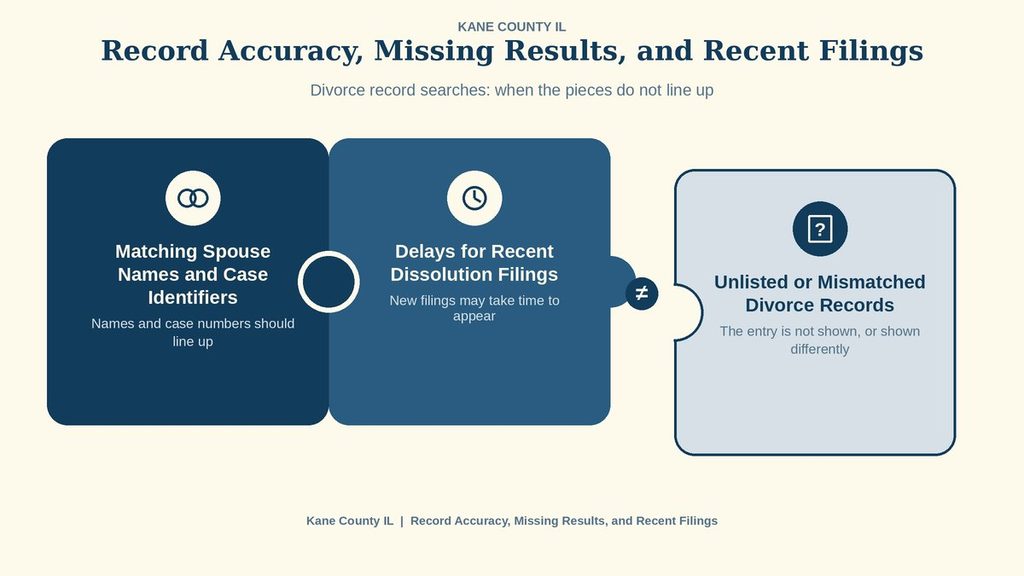
Matching Spouse Names and Case Identifiers
A spouse-name mismatch can occur when a search uses a current name, a former name, a different suffix, or a spelling that differs from the court record. Search each legal name separately and use the most exact form available. If a case number is available, use it with the name as a check instead of relying on the name alone. Similar names can place several family cases in the same result list.
The Circuit Clerk’s office can assist with an unlisted filing or a mismatch involving a spouse name. Give staff the names as shown on any filing or decree, plus the filing date and case number when known. If the number appears in an incorrect format, ask the clerk to confirm the court identifier rather than assuming it is a different case.
Delays for Recent Dissolution Filings
A recent dissolution filing may take time to appear in the public index. Court processing and record indexing can occur after the petition is filed, so an empty result during that interval does not prove that no case exists. Search again with the same case number and filing date after a reasonable interval. If a legal deadline depends on the record, contact the clerk rather than treating a zero-result screen as proof.
A filing date remains useful during this delay. It helps the clerk locate the paper case even if the public index has not received the case. Keep the names and date in the same order used on the petition to reduce the chance of a mismatch.
Unlisted or Mismatched Divorce Records
When a divorce record is not found, check each identifier before treating the case as absent. Some searches miss because the case number is mistyped or the legal case label differs. A case from another county belongs to that county’s court. Older matters may also sit in a record series that the current public search does not display.
- Confirm the complete case number and the correct county and court.
- Search each spouse by the exact legal surname shown on a court paper.
- Use the filing date or a date range when the case number is unavailable.
- Check the case label for dissolution wording as well as divorce wording.
- Confirm that the filing took place in Kane County rather than another jurisdiction.
- For an older case, ask whether the clerk holds it in an older or archived record series.
Contact the clerk with every known identifier: both names, case number, filing date, court, and any decree date. Ask staff to confirm the correct case number and available copy method. If the case was filed elsewhere, the receiving clerk can direct the request to the court that holds it. A zero-result search is a limit of that search, not a legal finding that no divorce was entered.
Verifying a Divorce Record for Legal, Financial, or Family Use
The right verification method depends on the purpose. A person checking family history can compare the docket, final decree, and later orders. An attorney, lender, government agency, or other recipient may require a clerk-certified copy. Ask the recipient which document and certification type it accepts before paying for records.
For each document, compare the party names, case number, court, filing date, decree or order date, and terms ordered by the court. If a later order changes support, custody, or parenting time, make sure that order is included with any earlier decree. A search result that omits a protected schedule should not be treated as proof that the schedule does not exist.
The Kane County Circuit Clerk is the official source for resolving an unlisted filing, an incorrect spouse name, or a wrong case identifier. Ask for clerk confirmation and, when needed, a certified copy. Use that court-issued copy instead of a private transcript or summary for any decision that requires an official record.
Historical and Archived Divorce Records
The current online index may not display every older Kane County divorce case. Older records can sit in a separate record series or require clerk retrieval. If a marriage ended in the past and the current search returns nothing, give the clerk the spouses’ names, approximate filing date, and any case number found on old papers. Staff can then check the proper record series.
For a historical case, ask whether the request should include the original decree, later modification orders, or the full docket. An old decree can remain part of the case history even after a later order changes support or custody terms. State that the case is historical and ask about any archive retrieval fee, submission steps, and current timing.
Do not use a marriage index, tax record, or deed index as a substitute for a missing divorce decree. Those sources document different events. The Kane County Circuit Clerk can confirm whether a historical divorce decree exists and which copy process applies.
Contact Information
Use the following official contact details when a divorce record cannot be located, a case identifier needs confirmation, or a certified-copy request needs assistance. The responsible court office can explain available search options and applicable record procedures. Keep the case number, party names, and approximate filing date ready when making an inquiry. Confirm current fees, office hours, and identification requirements before visiting or submitting a request. Contact the relevant office directly for the most accurate information about record availability and access.
Frequently Asked Questions
Divorce records contain the official paperwork from a marriage dissolution, including petitions, court orders, and final decrees. Accessing these documents helps verify legal status, resolve property issues, and confirm child‑support arrangements. In Kane County, the Circuit Clerk office offers online search tools and certified‑copy requests, making it easy to locate a divorce case by name, filing date, or case number. Understanding how to request and interpret these records saves time and avoids unnecessary trips to the courthouse.
How can I search Kane County divorce records online?
Start at the official Kane County Circuit Clerk website. Enter the party’s name, case number, or filing date in the search box. Review the list of matches and click the docket number to see petitions, orders, and the final decree. If the result looks correct, you can request a certified copy through the same portal or by phone. The system updates daily, so recent filings appear within 24 hours.
What steps are needed to request a certified copy of a divorce record?
First, locate the case using the online search tool. Note the docket number and the exact spelling of both spouses. Next, fill out the certified‑copy request form on the clerk’s site or download it for mail submission. Include a payment of $10 per copy and a valid ID. The clerk processes requests in 5‑7 business days and mails the certified document to the address you provide.
Can I find divorce case status by case number?
Yes. Enter the case number in the search field on the Circuit Clerk page. The status line shows whether the case is pending, closed, or appealed. For closed cases, the system displays the judgment date and a link to the final decree. This quick check helps confirm if a divorce is final before proceeding with related legal actions.
What if the divorce record I need is sealed or restricted?
Some records are sealed for privacy reasons, especially those involving minors. If the online search returns “restricted,” you must file a petition with the family court to lift the seal. Provide a valid reason, such as needing the document for a new marriage license. The judge reviews the request and may grant limited access.
How do I verify the accuracy of a divorce record found online?
Compare the details on the docket with the information you already have: spouse names, filing date, and case number. If any item differs, contact the clerk’s office at 630‑232‑3413 for clarification. You can also request a certified copy, which includes the official signature and seal, ensuring the record’s authenticity.